
Securi'Tips: What is phishing and how do you detect it on your smartphone?
April 26, 2023 · 4 min read
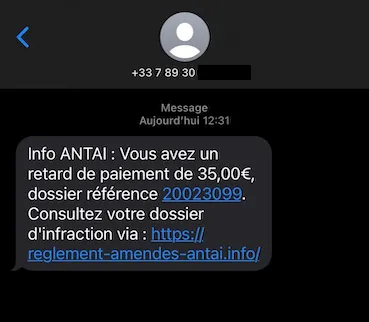
Despite appearances, this is not a message from the authorities in charge of traffic fines (ANTAI). It's actually a trap designed to harvest the recipient's payment information: this is what's known as phishing.
Let's take a closer look at exactly what phishing is and how to spot it.
1. Phishing
Phishing is a form of online scam. The scammer impersonates a well-known organization (a bank, a parcel delivery service, the tax office, etc.) via text message or email, copying its visual identity down to the smallest detail. This leads the recipient to follow a process in which they end up entering personal information, including their banking details. The site where this information is entered is run by the scammer, giving them access to the data so they can use it to steal money or impersonate the recipient.
Warning! Never click on the links or open the attachments, doing so could infect your phone!
2. Detecting phishing
As soon as you read the message, two things can raise doubts about the sender's identity:
- If you're not expecting a fine (fine notices are always sent by post, so if you are expecting one, you can simply wait for the letter to arrive)
- The URL sent doesn't carry the official government domain suffix (.gouv.fr)
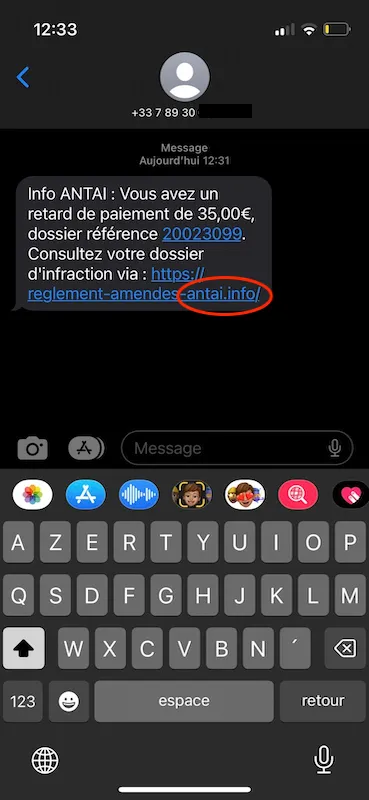
Other elements commonly found in fraudulent messages can also help identify them:
- Spelling mistakes
- Unexpected wording or phrasing for the organization supposedly sending the message
- Odd requests
If you notice one or more of these red flags, don't open the attached link and don't share any personal information with the sender. To be even more cautious, never open links from unknown numbers.
If you did open the link by accident and the site looks legitimate, don't be fooled. Cybercriminals manage to reproduce the sites of the organizations they impersonate almost perfectly.
In our example, clicking on the link in the message brings up an almost perfect replica of the ANTAI website. Still, a few differences between the original and the copy can be spotted:
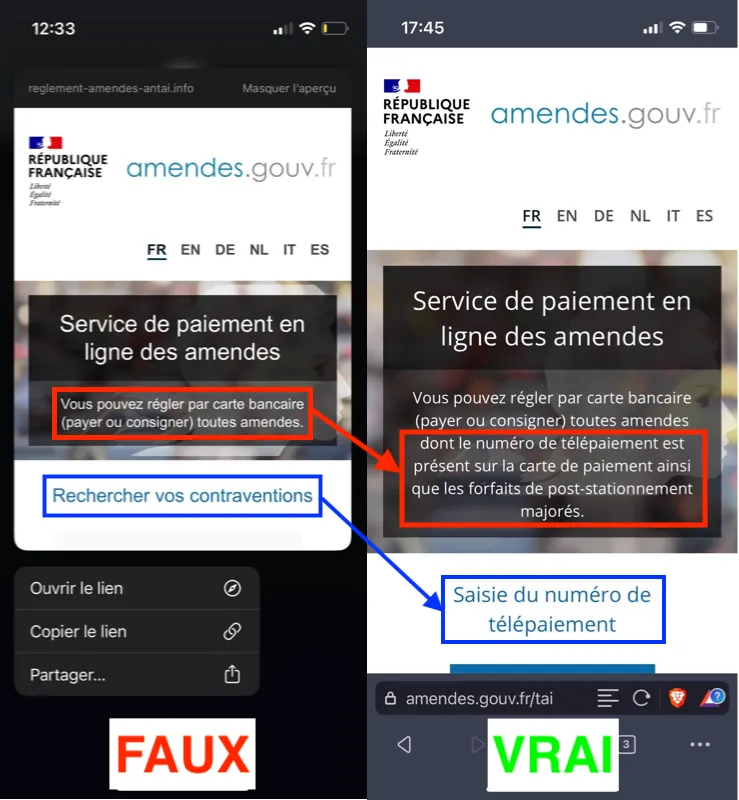
Now let's see how to check the authenticity of a link without opening it.
3. Detecting phishing with VirusTotal
The VirusTotal website lets you scan suspicious URLs and files. To do this, simply copy the URL without opening it:
1) Long-press on the message (NOT on the link) and select "Copy"
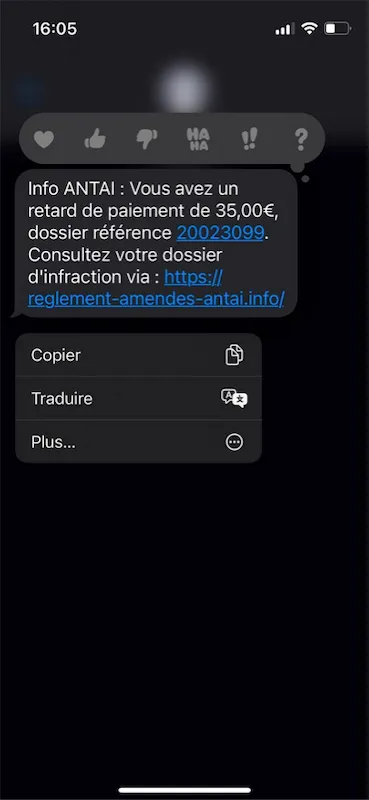
WARNING: do not select only the link itself, which would bring up the "Copy link" option. That would open a preview, which is equivalent to opening the link and would expose you to any malware it might contain.
2) Go to VirusTotal: https://www.virustotal.com/gui/home/upload
3) Click on the "URL" tab
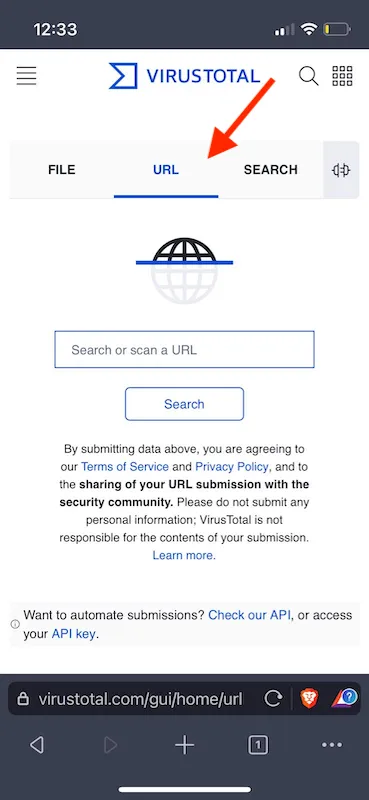
4) Long-press on the search bar to bring up the options and tap "Paste"
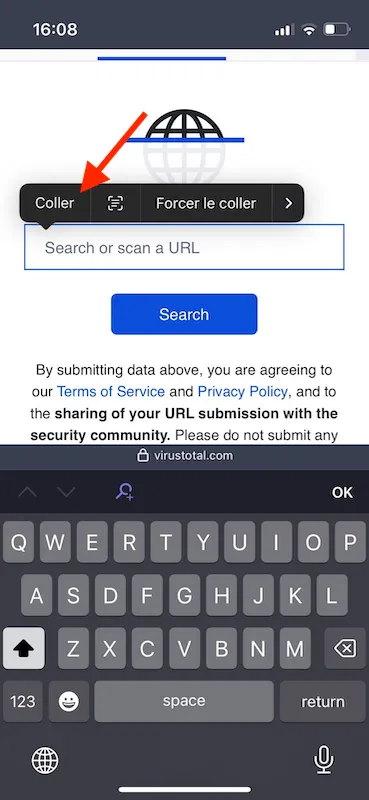
The whole message will now appear in the search bar, but the URL won't be clickable, so there's no risk of opening it by accident.
5) Move your cursor to the beginning of the URL and delete the rest of the message using the backspace key
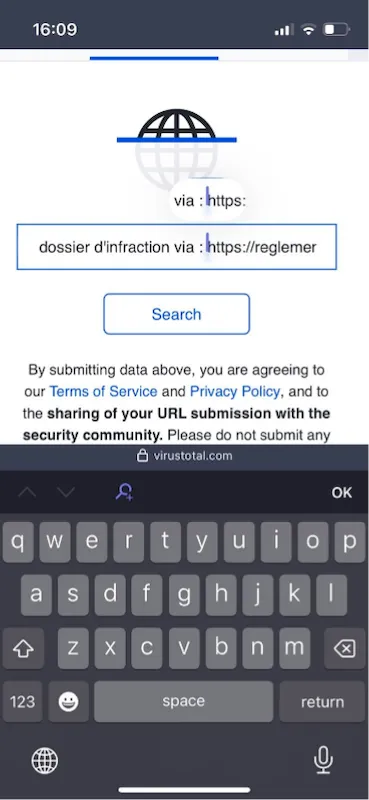
You can also manually type out the full URL in the search bar so you don't have to click on the message at all, avoiding any risk of opening the link.
6) Once only the URL remains in the search bar, click the "Search" button
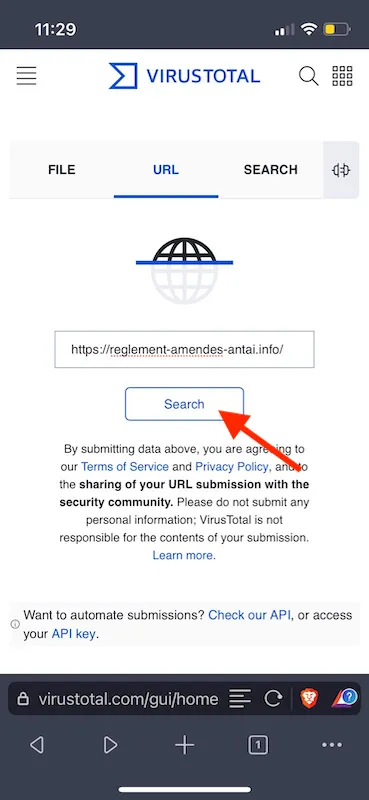
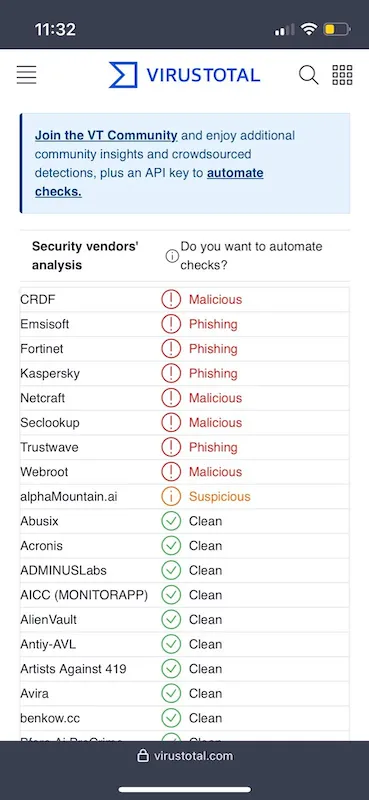
7) VirusTotal aggregates analyses of the link from various cybersecurity companies (Fortinet, Kaspersky, etc.). If several of them flag it as dangerous ("Malicious", "Phishing" shown in red) or suspicious ("Suspicious" shown in orange), then the link is malicious. This confirms that the message was indeed phishing.
4. Reporting it to the CNIL
You can then report the link as a "Scam" on PHAROS, the official portal for reporting illegal internet content, so that the site can be taken down by the relevant authorities.
5. Cleaning up
Once you've identified a phishing message, delete it to avoid any chance of clicking on it later.
Phishing is an increasingly common and increasingly sophisticated fraud technique, so it's important to know how to protect yourself against it and to share that knowledge with others.
While this article focuses on SMS phishing, fraud attempts by email, phone call, or even regular mail are just as common, so it's important to stay alert across every communication channel.
For more digital security tips and OSINT content, follow Predicta Lab on Twitter, LinkedIn and Twitch.
Don't miss our future newsletters !
Get the latest OSINT news, monthly recaps and product updates in your inbox.
More articles from Predicta Lab
April 16, 2024 · 7 min read
GEOINT: Using Overpass Turbo for OSINT
Overpass Turbo (OPT) allows you to search for mapped information in the Open Street Map database using command-line queries, making it an unrivalled geolocation tool. This article will show you how to build simple queries to make OPT accessible to everyone.

May 17, 2023 · 6 min read
OSINT Tools: Streamline Your Investigations with Tampermonkey
Tampermonkey is a browser extension that lets you add or modify the features of the websites you visit: let's see how to create your own userscripts to save time in your investigations.

March 24, 2023 · 12 min read
How to remove your personal data from Google?
You've probably searched your name on Google before, chances are the results included some social media profiles and maybe even some pages you had forgot existed. This article explains how to get Google to deindex a web page containing your personal data.

February 14, 2023 · 7 min read
OSINT Tool: How to transcribe a video
How to install and run Whisper, the automatic speech-recognition system developed by OpenAI, with limited coding skills — and put it to the test on a TikTok video of a Russian soldier describing combat.
