
OSINT Tool: How to transcribe a video
February 14, 2023 · 7 min read
Today we will use Whisper, an automatic speech-recognition system developed by OpenAI to obtain a video transcript. It supports more than 90 languages with varying degrees of correctness but it is said to approach “human level robustness and accuracy” for English. Luckily for us, it was made available to the public in open source last September.
This article will show how to install and run Whisper with limited coding skills. Then, we will put it to the test with a TikTok video of a Russian soldier describing combat over the sound of explosions and background music.
Why ?
Transcription tools are very valuable when investigating a subject in a language that you don’t speak : they allow audio material to be taken into account without having the linguistic skills to do so and without relying on secondary sources. Unfortunately, these tools tend to be available solely for English-speech recognition and they tend to be pricey.
Thus, an open-source system that has been trained on 680 000 hours of multilingual data has the potential to be very useful.
Nevertheless, Whisper still presents a barrier to use : it has to be installed and used with a command line. If you are like me, that can be enough to deter you from using it, but don’t you worry, I have gone through the merciless task of figuring out how to set it up and run it so that I can share it with you in simple terms.
Disclaimer : This is the procedure to set it up on a Mac operating system. If you are working on Windows or Linux, you will find indications on how to install and run Whisper here and here.
How ?
Setting up the dependencies
1. Go to the Launchpad
2. Open the file “Other”
3. Open the app “Terminal”
For the following instructions, type the commands written in italic. Be careful to copy it exactly, down to the spaces and the capitalization of letters.
4. Install brew
The command below is a single line, you don’t have to go to a new line when copying it.
/bin/bash -c “$(curl -fsSL https://raw.githubusercontent.com/Homebrew/install/HEAD/install.sh)"
5. Install Python
brew install python
6. Check the installation was successful
python3 --version
If the terminal prints “Python 3.0” or above, the installation was successful.
7. Install PyTorch
pip3 install torch torchvision torchaudio
8. Install ffmpeg
brew install ffmpeg
Setting up Whisper
9. Create a dedicated Whisper folder
mkdir Whisper
10. Change directory on your Terminal to go inside
cd Whisper
Before jumping to the next step, it is interesting to know about virtual environments. A virtual environment is a function that allows tools and their dependencies (such as Whisper and PyTorch) to be kept separate from the rest of your machine by creating an isolated python virtual environment to install them into. Hence, if you are wary of installing/doing something you shouldn’t, you can do it in a controlled space that will not affect the rest of your system and that can easily be discarded if something goes wrong.
11. OPTIONAL — Creating virtual environment in a file
virtualenv -v venv
12. OPTIONAL — Jump into the virtual environment
source venv/bin/activate
13. Installing Whisper
pip install -U openai-whisper
Running Whisper
Note : Because Whisper uses ffmpeg, it supports the same audio formats. Fortunately ffmpeg supports many different formats, type ffmpeg -formats in the command line to see the list.
11. Using Whisper for speech-to-text transcription
Here I suggest you place the audio file in the same directory as Whisper like you normally would, so that your [relative path to target file] will simply be the name of the file (e.g. audio.wav ).
whisper [relative path to target file] --model medium
After doing this command, wait for the transcription to be complete. The result should look something like that :
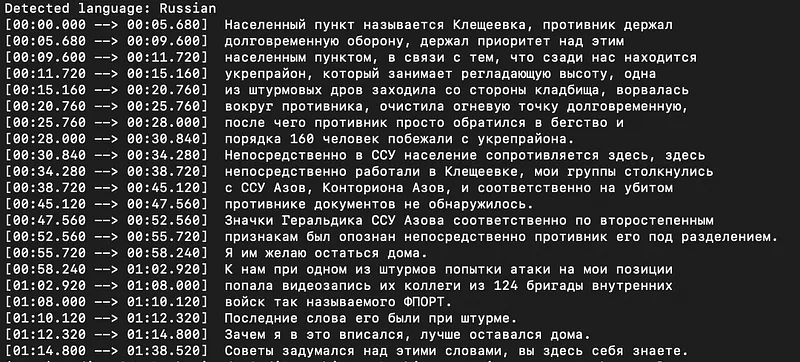
You will also find these results in different formats (.txt, .json, .srt, .tsv, .vtt) in your Whisper file.
You can also ask Whisper to directly translate the transcription to English using the following commands :
15. OPTIONAL : direct translation of the speech transcribed
whisper [relative path to target file] --task translate
However, from what I can tell the translation isn’t as reliable as what you can get on Deepl for instance, so it’s best to only rely on Whisper for speech-to-text transcription.
The test
We will now see whether the result of the transcription from speech to text in Russian corresponds to what is being said in the TikTok video. To do so, I asked our Russian-speaking analyst to help out. Although she is not fluent, she knows enough Russian to recognize whether the text transcribed corresponds to what is being said in the video, which is just what we need.
Subject
We will run Whisper on the audio of a TikTok video. The video shows a Russian soldier being interviewed not far from combat. This is a good exemple not only because it is in Russian, a language I don’t speak but that I often encounter in my investigations, but also because the speech is interfered with by the sound of explosions and background music. It will be interesting to see whether that is an issue for the recognition of the speech or not.
Results
The text in cyrillic below is the transcription of the TikTok, as delivered by Whisper. The analyst who corrected it is sure at 80% of the accuracy of her work.
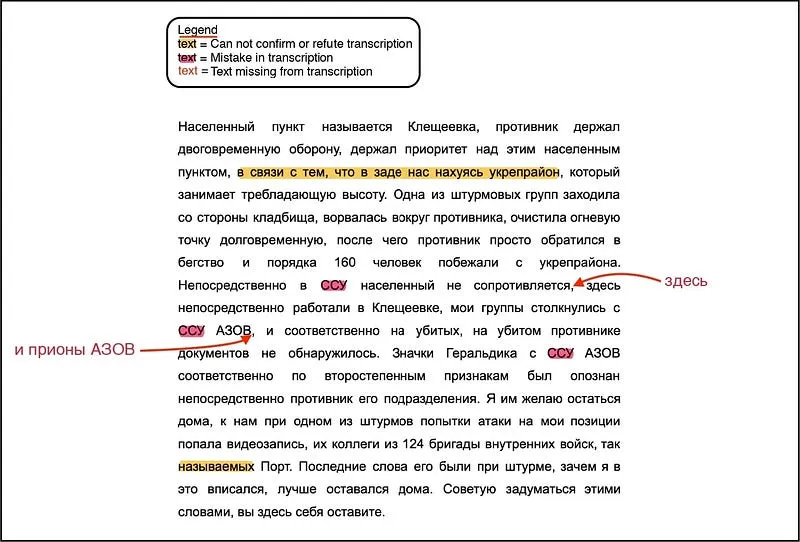
The correspondence of the phrases highlighted in yellow to the audio could not be confirmed or refuted. They are moments when the soldier isn’t speaking clearly or when the background noises cover his speech, making it hard to distinguish what he says with certainty.
Moreover, as highlighted in pink, Whisper did not identify the conjunction articles (‘в’ et ‘с’) and therefore mis-transcribed the acronym “ВСУ” into “ССУ”.
Then, the text written in red indicates moments when the speech was not transcribed by the tool, the red phrases are propositions of transcription.
Overall, we can assess that Whisper is a powerful tool who made a mostly-reliable transcription of Russian language despite the alteration of the sound environment by the use of familiar language, the background music and the sound of combat.
Limitations
1. The impact of extraction
We tried to run Whisper on two different files of the same audio : both are the sound extracted from our TikTok video but they were extracted using different means.
The first procedure was to download the video from TikTok using the GitHub tool yt-dlp, then the sound was extracted in a separate .m4a file using the QuickTime Player app (File > Export as > Audio only).
The second procedure directly downloaded the sound in .mp3 format using the online app SSSTIK.
After running each file through Whisper separately, we found some slight differences in the transcription. Here is a table listing all the discrepancies, with their translation according to Deepl Translates.
2. Error rate according to target language
As we have said, Whisper supports more than 90 different languages. However, there are some disparities in word error rates (WER) across languages.
The diagram below shows these error rates for each language when applied to the language data-set Fleurs (commonly used for transcription and translation benchmarks). Languages with lower error rates indicate that transcriptions of these languages are more reliable than for languages with higher error rates.
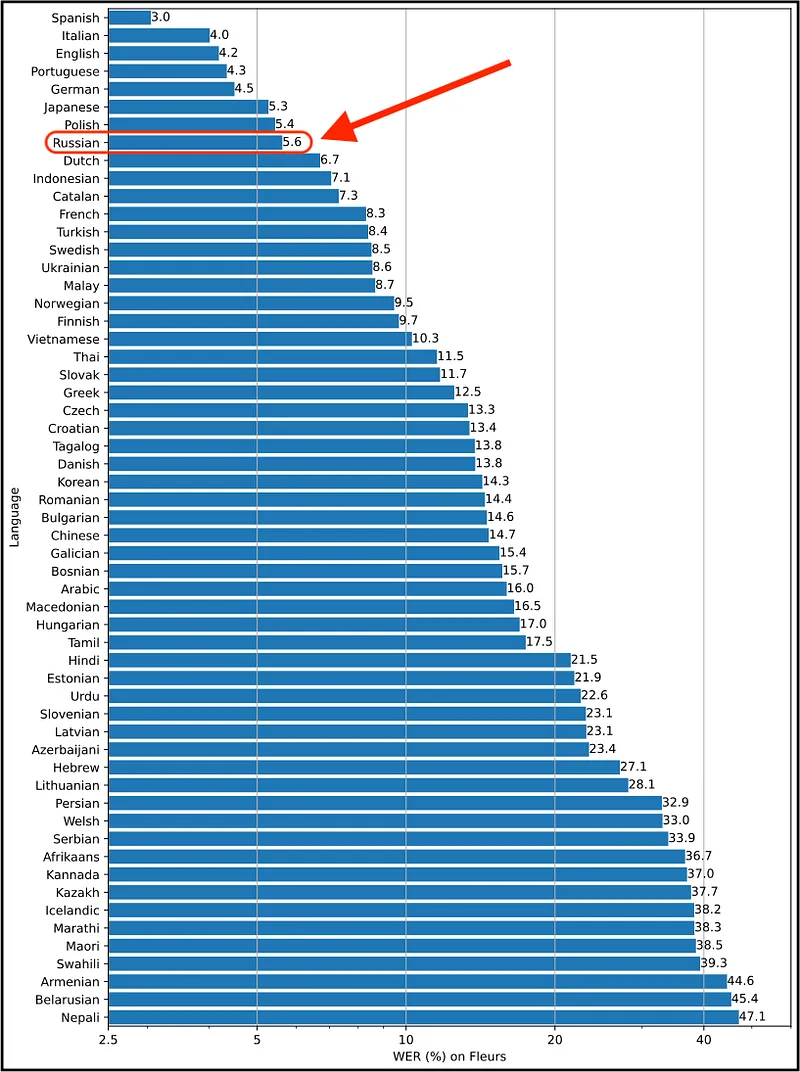
As indicated in red, Russian has a 5.6% word error rate which makes it mostly reliable. However, Chinese has a 14.7% word error rate, which can be significant. Again, this is a factor to keep in mind when using Whisper.
Conclusion
Whisper is a great transcription tool for many languages, especially considering the lack of affordable and diverse options for the transcription of languages other than English. Once the installation-process is overcome and once the command lines to use it are understood, it allows for the comprehension and analysis of audio material in languages one may not master. Personally, I was also impressed by the quality of the transcription despite the sound elements interfering with the speech in the video we tested (background noise and music). Moreover, Whisper allows you not to rely on external solutions and to conduct the transcription locally on your computer.
Nevertheless, this tool is obviously not perfect : it is best to consult the word error rate for your target language before relying on its transcription and you should always assess the impact of sound extraction processes when using Whisper.
With these factors in mind, my only advice is to make the most of it !
If you want to be notified when we upload new content be sure to follow us on Twitter, Youtube, and LinkedIn. You can find the rest of our articles on Medium.
Don't miss our future newsletters !
Get the latest OSINT news, monthly recaps and product updates in your inbox.
More articles from Predicta Lab
April 16, 2024 · 7 min read
GEOINT: Using Overpass Turbo for OSINT
Overpass Turbo (OPT) allows you to search for mapped information in the Open Street Map database using command-line queries, making it an unrivalled geolocation tool. This article will show you how to build simple queries to make OPT accessible to everyone.
May 17, 2023 · 6 min read
OSINT Tools: Streamline Your Investigations with Tampermonkey
Tampermonkey is a browser extension that lets you add or modify the features of the websites you visit: let's see how to create your own userscripts to save time in your investigations.
April 26, 2023 · 4 min read
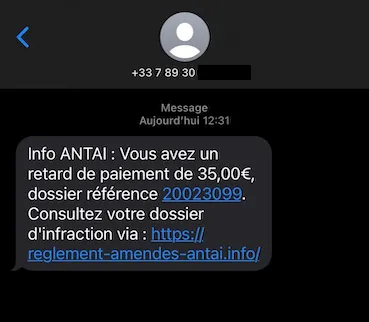
Securi'Tips: What is phishing and how do you detect it on your smartphone?
Despite appearances, this message wasn't sent by ANTAI (the French traffic fine authority): it's a trap designed to harvest the recipient's payment information. Let's take a look at exactly what phishing is and how to detect it on a smartphone.

March 24, 2023 · 12 min read
How to remove your personal data from Google?
You've probably searched your name on Google before, chances are the results included some social media profiles and maybe even some pages you had forgot existed. This article explains how to get Google to deindex a web page containing your personal data.
