
OSINT Tools: Streamline Your Investigations with Tampermonkey
May 17, 2023 · 6 min read

Whatever the investigation, time is a decisive factor. Any tool, method, or technique that saves time is therefore extremely valuable. In this article, we'll explore a tool that will help you optimize your research: Tampermonkey.
Tampermonkey is a browser extension that lets you add or modify the features of the websites you visit. So whether you need to change a site's search function, automatically extract its photos, or automatically translate comments, you can simply write a script for it in Tampermonkey, and it will take care of running it.
These scripts are called "userscripts" and must be written in JavaScript, but don't worry: we'll see that someone with little to no development skills can create a functional userscript without too much trouble.
First, let's see how to install Tampermonkey.
1. Installation
Tampermonkey installs like most extensions: through your browser's extensions menu. The Tampermonkey website makes this easy: head to https://www.tampermonkey.net/ , the site will automatically open the tab corresponding to your browser, and all you need to do is click "Go to store" in the "Download" section to reach the right page in the extensions menu.
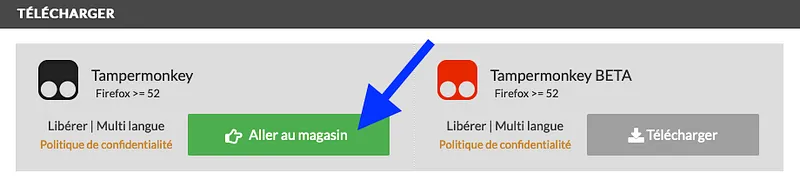
From there, add Tampermonkey to your browser as you would any other extension, and you'll find its shortcut next to your search bar. If not, click your browser's extensions shortcut and pin Tampermonkey to the toolbar.
2. Usage
Clicking the Tampermonkey icon will show you the "Dashboard" option.
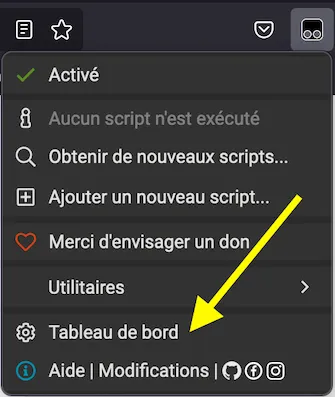
From this dashboard, you can find the userscripts you've created, edit them, enable them, disable them, and delete them.
3. Creating your own userscript
Now let's get to the heart of the matter: creating a userscript.
In the Dashboard, click the (+) tab to the left of the "Installed userscripts" tab.
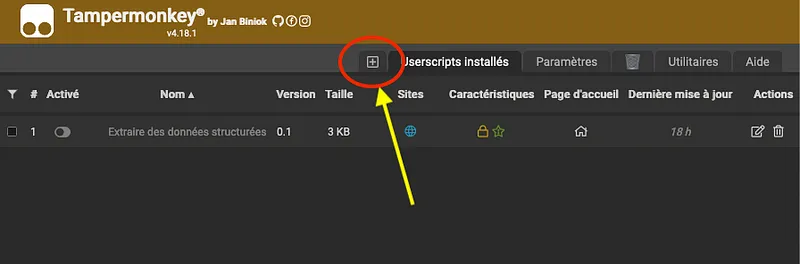
The first 10 lines define the script's documentation header, let's see how to fill them in.
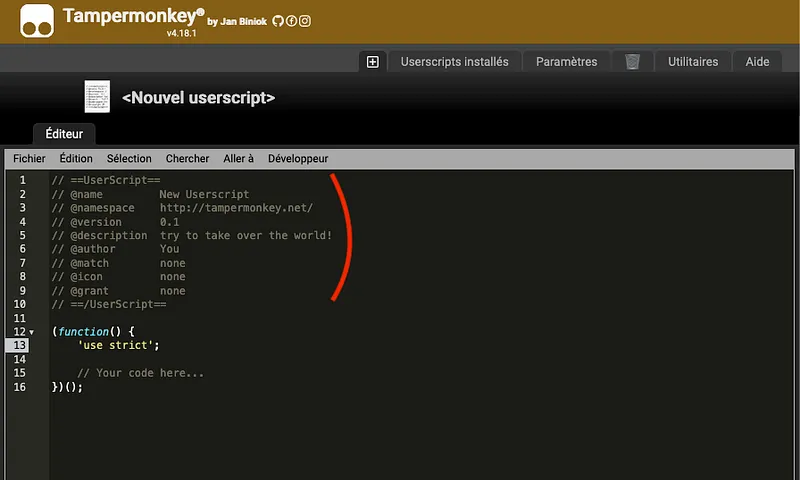
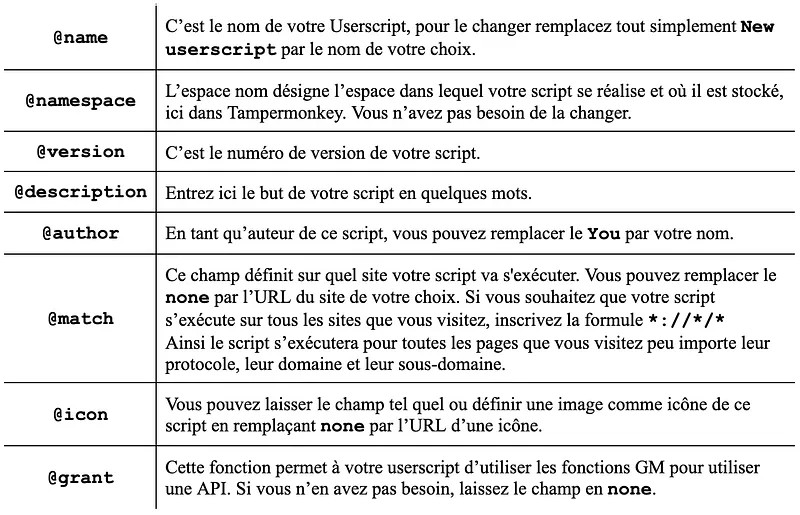
Once these settings are in place, the rest of the page is dedicated to writing your script. If you're short on inspiration, know that there are many forums dedicated to sharing userscripts with the community, such as Userscript.Zone Search, Greasy Fork, GitHub Gist, OpenUserJS. However, these scripts can carry security risks: if you have some knowledge of JavaScript, it's recommended that you understand and check how they work before using them. Otherwise, it's safer to stick to your own scripts.
You don't necessarily need JavaScript skills for this. Personally, I have virtually no coding skills, so I asked an artificial intelligence to write my scripts for me. Whether it's Chat GPT or, more recently, Bard (with a VPN), these tools are capable of writing functional and efficient scripts, and it's with their help that I wrote a userscript that extracts emails, phone numbers, and IP addresses from a web page.
Starting from the following prompt:
Write a script to use on Tampermonkey to extract emails, phone numbers, and IP addresses from a page, using JavaScript.
I then asked it to display a button to click in order to extract the data and show it in a pop-up window directly on the web page.
And finally I asked it to optimize the code. It can also be optimized by changing the regex (regular expressions): these character sequences are the patterns that data must match in order to be flagged as an email, phone number, or IP address. Regexes are written in their own language, and there are regex libraries for all kinds of data, for example Regular Expressions 101.
I also asked the AI to comment the script line by line so I could understand how it works.
This is how I arrived at the following script:
// ==UserScript==
// @name         Extraire des données structurées
// @namespace    http://tampermonkey.net/
// @version      0.1
// @description  Extraire les adresses e-mail, les numéros de téléphone et les adresses IP d'une page Web
// @author       Santa
// @match        *://*/*
// @grant        none
// ==/UserScript==

(function() {
    'use strict';

    function extractEmails(text) {
        const regex = /[\w._%+-]+@(?!1x\.png|2x\.png)[\w.-]+\.[A-Za-z]{2,}/g;
        return text.match(regex);
    }

    function extractPhoneNumbers(text) {
        const regex = /\+?(\d[\s-]?){10,13}/g;
        return text.match(regex);
    }

    function extractIPAddresses(text) {
     const regex = /\b(\d{1,3}\.){3}\d{1,3}\b/g;
     return text.match(regex);
    }

    function displayData(emails, phoneNumbers, IPAddresses) {
        let message = 'Adresses e-mail trouvées :<br>';
        message += emails ? emails.join('<br>') : 'Aucune adresse e-mail trouvée.';
        message += '<br><br>Numéros de téléphone trouvés :<br>';
        message += phoneNumbers ? phoneNumbers.join('<br>') : 'Aucun numéro de téléphone trouvé.';
        message += '<br><br>Adresses IP trouvées :<br>';
        message += IPAddresses ? IPAddresses.join('<br>') : 'Aucune adresse IP trouvée.';


        const modal = document.createElement('div');
        modal.style.position = 'fixed';
        modal.style.top = '0';
        modal.style.right = '0';
        modal.style.bottom = '0';
        modal.style.left = '0';
        modal.style.zIndex = '1000000000';
        modal.style.backgroundColor = 'rgba(0, 0, 0, 0.5)';
        modal.style.display = 'flex';
        modal.style.justifyContent = 'center';
        modal.style.alignItems = 'center';

        const modalContent = document.createElement('div');
        modalContent.style.backgroundColor = 'white';
        modalContent.style.padding = '20px';
        modalContent.style.borderRadius = '5px';
        modalContent.style.maxWidth = '80%';
        modalContent.style.maxHeight = '80%';
        modalContent.style.overflowY = 'auto';

        const modalMessage = document.createElement('div');
        modalMessage.innerHTML = message;
        modalContent.appendChild(modalMessage);

        const closeButton = document.createElement('button');
        closeButton.textContent = 'Fermer';
        closeButton.style.marginTop = '10px';
        closeButton.onclick = () => {
            document.body.removeChild(modal);
        };
        modalContent.appendChild(closeButton);

        modal.appendChild(modalContent);
        document.body.appendChild(modal);
    }

    function createButton() {
        const button = document.createElement('button');
        button.textContent = 'Extraire les données';
        button.style.position = 'fixed';
        button.style.top = '10px';
        button.style.right = '10px';
        button.style.zIndex = '1000000000';
        button.onclick = () => {
            const text = document.documentElement.innerHTML ;
            const emails = extractEmails(text);
            const phoneNumbers = extractPhoneNumbers(text);
            const IPAddresses = extractIPAddresses(text);


            displayData(emails, phoneNumbers, IPAddresses);
        };

        document.body.appendChild(button);
    }

    createButton();
})();
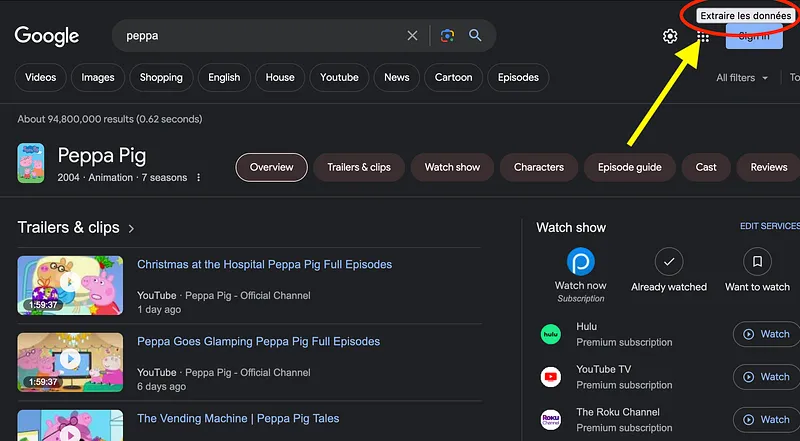
When this script is enabled in my browser, an "Extraire les données" button appears in the top right corner of the window, which opens a pop-up window displaying the data extracted from the page.
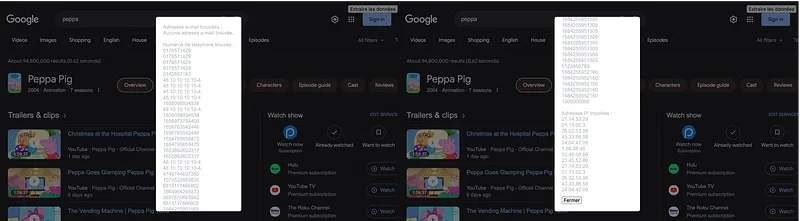
The regular expression that dictates the phone number format allows for numbers up to 13 characters long, which lets me include international numbers along with their country code. The downside of this limit is that my script returns a large number of false positives: to reduce that number, I could lower the regex's character limit to 10. Alternatively, I could also replace the constant document.documentElement.innerHTML with document.body.innerText on line 82, so that data is extracted from the displayed text rather than the source code. Extracting data from the displayed text reduces the number of false positives, but unlike extracting from the source code, it won't pick up data that is hidden or collapsed in the page's display.
For example, on the Pages Jaunes website, phone numbers are hidden in the page's default display.
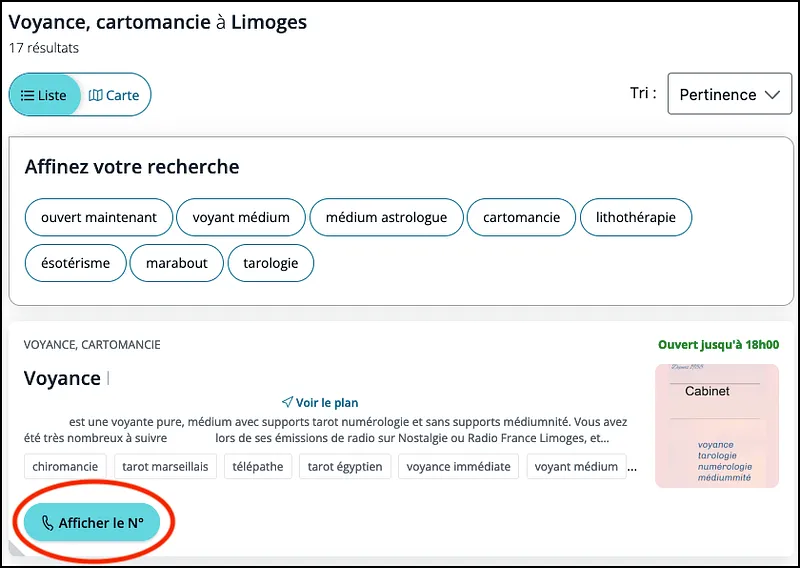
In this case, using the constant document.documentElement.innerText won't pick up the number from the result, whereas the constant document.documentElement.innerHTML will.
So, two scripts with the same function can be adapted in a thousand different ways depending on the needs they serve.
The "Extraire des données structurées" script automatically pulls out data you can pivot on during an investigation and makes archiving easier, but this only scratches the surface of what Tampermonkey can do. Feel free to test its limits yourself: you could create a script to save the web pages you visit to the WaybackMachine in order to preserve your sources, or build one that automatically searches for social media profiles matching the names you select…
Feel free to share your creations with us on Twitter and LinkedIn!
Don't miss our future newsletters !
Get the latest OSINT news, monthly recaps and product updates in your inbox.
More articles from Predicta Lab
April 16, 2024 · 7 min read
GEOINT: Using Overpass Turbo for OSINT
Overpass Turbo (OPT) allows you to search for mapped information in the Open Street Map database using command-line queries, making it an unrivalled geolocation tool. This article will show you how to build simple queries to make OPT accessible to everyone.

February 14, 2023 · 7 min read
OSINT Tool: How to transcribe a video
How to install and run Whisper, the automatic speech-recognition system developed by OpenAI, with limited coding skills — and put it to the test on a TikTok video of a Russian soldier describing combat.

April 26, 2023 · 4 min read
Securi'Tips: What is phishing and how do you detect it on your smartphone?
Despite appearances, this message wasn't sent by ANTAI (the French traffic fine authority): it's a trap designed to harvest the recipient's payment information. Let's take a look at exactly what phishing is and how to detect it on a smartphone.

March 24, 2023 · 12 min read
How to remove your personal data from Google?
You've probably searched your name on Google before, chances are the results included some social media profiles and maybe even some pages you had forgot existed. This article explains how to get Google to deindex a web page containing your personal data.
