
How to remove your personal data from Google?
March 24, 2023 · 12 min read

You’ve probably searched your name on Google before, chances are the results included some social media profiles and maybe even some pages you had forgot existed. This kind are sometimes old and somewhat embarrassing. If you want to make these pages disappear, look no further: this article explains how to get Google to deindex a web page containing your personal data.
But first, here’s a summary of what we’re going to see, so that you can jump to the juicy bits if you want to :
1. Deindexing? What does it mean?
2. The right to erasure
3. Which data can be deindexed?
4. What criteria are evaluated?
5. How do I make my request to Google?
6. How do I demand to a site to delete my personal data?
1. Deindexing? What does it mean ?
Contrary to what one might think, Google does not have access to all the pages present on the web: it can only access the pages present in its index and only these pages appear as the results of searches made on the search engine. Therefore, by removing a page from its index, Google removes this page from its search results. This page will no longer appear as a result of any search made by users. This process is called “deindexing” or “dereferencing”.
NOTE The page deindexed by Google may still be displayed as a result by other search engines like Bing or Yandex, because they have their own indexes, see part 6 to circumvent this issue.
Deindexing makes your personal data less accessible online and therefore reduces the risk of it being used for malicious purposes such as phishing or spear-phishing. If you live in the European Union, you have a legal right to have your personal data deleted from the web : this is the right to erasure.
2. The right to erasure
The right to erasure or “right to be forgotten” is provided by Article 17 of the General Data Protection Regulation (GDPR). It gives you the right to request to an organization to erase the personal data they have about you. According to the GDPR that includes any data that directly or indirectly identifies you, such as your login details, nicknames, photos, location data, etc. (see Article 4). This right only applies to natural persons, it cannot be applied to legal entities (companies, organizations).
3. Which data can be deindexed?
Of course, not every page containing personal data can be deindexed by Google (that’d be too easy). The following type of information can be deindexed with a simplified procedure:
- Non-consensual intimate or explicit images
- Involuntary fake pornography
- Irrelevant pornography search result for your own name
- Images of minors
- Content about you posted on a site telling you to pay to remove it
- Personally identifiable information (PII) or doxing
Here PII refers to the following data: government identification numbers, bank account numbers, credit card numbers, images of handwritten signatures, images of identification documents, personal and confidential documents, identification data.
Pages containing these types of information may be deindexed from Google for good: they will no longer appear in any search.
However, if the personal data you want to remove does not fall into any of the categories listed above, there is another way to have it partially deindexed.
Google Support’s procedure for invoking the right to be forgotten allows for pages containing your data to be deindexed solely from the search results of your name in the European versions of Google. Thus, if the request is granted, the page may still appear among the results of other searches and in results for you name searched outside of the EU.
For instance, if Jean Du Jambon asks Google to deindex the article that presents him as the winner of the National Best Ham Contest 2012, the article will no longer in the results of the Google search for “Jean Du Jambon” for people searching from the EU. However, it will still appear in the search results for the search “National Best Ham Contest 2012” everywhere and in the Google search results for “Jean Du Jambon” made from outside of the EU.
Thus, it is more sustainable to have your personal data deleted directly from the page where they are published to remove them for good, this way they will no longer be displayed by any search engine. However, this procedure requires to contact the owners or administrators of every site where your data is posted, which is much more tedious than the Google procedure and not always effective if you receive no answer from the administrators.
So let’s see how to optimize your request to Google.
4. What criteria are evaluated?
When Google receives a deindexation request, its support department has to determines whether the information in question is “inaccurate, inadequate, irrelevant or excessive” (in which case it will accept the request) or whether it is in the public interest that it remains available in search results (in which case it will reject it). The following criteria are taken into account in making this decision.
- Your role in public life: Public figures have a specific role in the public information space, if the data concerned is relevant to their role it may not be deindexed.
- The source of the information: Google takes into account whether the information is present on pages of government sites or news sites as these facts imply that the information has been deemed to be of public interest.
- Date of publication: The relevance of a content is closely correlated to how old it is, therefore Google checks if the content is up to date, or if it has become obsolete due to an event that occurred after its publication.
- Consequence for Google users: The platform evaluates whether the page concerned by the request is consulted frequently by other users.
- True or false statement: Your request may be supported by legal documentation (e.g. a judicial decision in your favor) providing the relevance of your request.
- Sensitive data: Sensitive data is more likely to be removed from the results, including information about health, sexual orientation, ethnicity and religion.
Thus, Google evaluates the relevance of the page in question, whether it is verified, the publication date and the sensitivity of the information.
5. How do I make my request to Google ?
To ask Google to deindex pages from the search for your name on Google, simply fill out this form and provide the following information.
A. Country where the law applies
Enter the country of the EU where you live.
B. Your information
Enter your legal name as it appears on your ID and your contact email address, but do keep in mind that Google is allowed to ask you to prove your identity by providing official documents.
C. I act on behalf of…
You can deindex personal data for yourself or for someone else, in which case you will have to indicate your relation and possibly prove it with various documents.
D. Identify the personal data you want to deindex and its location
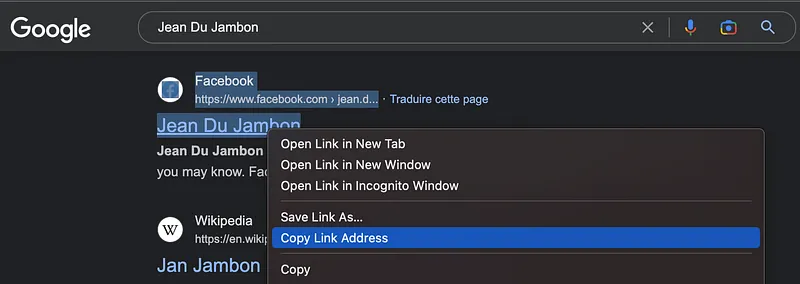
Here we get to the heat of the matter: you are first asked to list the URL of the pages you want deindexed from the search of your name. To get them, start by searching your name in Google and for each result you want deleted, right click on the title, select “Copy Link Address” and paste it (Ctrl+V) in the box “URL of the content containing the personal information you wish to delete”. Follow the same steps for the images (do not select “Copy image address”). You can make your request for several URL by copying each on a different line in the box.
Now in the “Reasons for deleting” box, you have to indicate what personal data is concerned and the reasons why you feel deleting them is necessary. Feel free to go back to part 4. to consider the criteria taken into account in the evaluation of your demand.
For any application, it is good to insist on:
- The date of the information if it is old (and therefore no longer relevant),
- If the personal concerns a minor at the time of publication (even if you/they are no longer a minor),
- If the personal data has been shared without your consent,
- If your profession requires you to limit the accessibility of your personal data online.
Be sure to list the reasons for your demand in the order that corresponds to the order of the URLs.
You can give several reasons for deleting a link and it’s probably best to increase your chances of success.
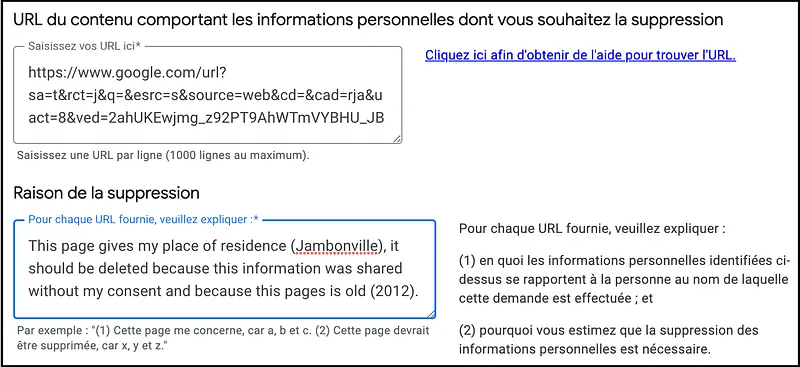
The form also gives the possibility to “Add a new group” where URLs and reasons for deleting a page can be entered “if this notification mentions several reasons for this infringement”. However, this feature is not explained and not consistent with the example that invites users to give multiple reasons for deleting the same URL. I made a request to delete several URLs for various reasons, I indicated all of them in the same group and my request was approved for all of them. This seems to indicate that it is not necessary to use a new group, but an explanation of this feature by Google would be preferable.
E. Name used for the search
For the next step, you need to indicate the name or names you are looking for in order to have these pages shown in the results, separating them with a “/” if there are several.

F. Signature and consent
Finally, you have to check all the boxes in the “Statement of honour” section, fill in the “Signature” section and then click “Send” to finalize your application.
WARNING Google shares some content removal requests with a third-party project called Lumen, which analyzes these requests to study the frequency of legal threats. The following data may be shared with Lumen: type of removal request; URLs reported; country where the request was made; date of the request; and explanation of the local law allegedly violated by the content reported in the removal request form.
G. After submitting your request
Once you submit your request, Google may ask you to prove your identity with official documents, but only if it has reasonable doubts about your identity.
You will receive a confirmation email to the email address you provided within hours of submitting your request. The confirmation will contain all the information you entered in the form and a tracking number, so it is wise to keep it.
If the request is approved, you will receive a confirmation email within a few days and the content will be deleted within a few hours following the email.
However, if your request is rejected by Google, you can contest this decision you can take the matter to court.
Because this procedure is automatic, the deindexing of the targeted pages can be done in only a few hours for the fastest requests. However, as we have seen, the scope of this deinexing is very small (one search engine, one search, in one geographical area) and a simple VPN can bypass its effects. It is therefore wiser to delete personal data directly from the pages where they are registered.
6. How do I demand to a site to delete my personal data?
Unfortunately, there is no single form to fill out and your osinter skills will be put to the test. The steps to get personal data removed from a site are as follows:
A. Find the contact of the data protection officer or of the site administrator
According to the GDPR, any entity processing personal data must appoint a data protection officer (DPO) who will be in charge of handling relating to the GDPR. Thus, you will find on most websites a “Legal Notice” or “Privacy Policy”, usually accessible through a link at the bottom of the homepage. The notices generally include the name of the DPO and/or an email dedicated to the processing requests to delete content. You should send your request to that email.
If the targeted site does not have a privacy policy or a declared DPO, you can try to contact the site administrator. His identity will be indicated in the domain registration information for the site if it is not anonymized. You can access them on websites such as Who.is or ViewDNS.info by entering the domain name (e.g. site.com).
B. Invoke your right to erasure by email
Once this precious contact is obtained, you can formulate your request by following the model below (recovered on Journal du Net):
Dear Sir or Madam,
In accordance with Article 17.1 of the General Data Protection Regulation (GDPR), I hereby request that you delete from your files and website all personal data concerning me.
[Indicate the reason(s) for your request.]
I therefore request that you delete the following data:
[List the data concern and add the URLs where to find them if applicable]
I also request that you notify the various organizations to which you may have disclosed my data about this request to delete them (according to Article 19 of the GDPR). Upon reception of this letter, you have one month to delete all my personal data (according to article 12–3 of the RGPD).
In the absence of a response from you within the time frame indicated, or in the event of an incomplete response, I will send a formal complaint to the national authorities [name the authority or institution responsible for data protection matters in your country].
Until you confirm the deletion of my personal data, please accept, Madam, Sir, my best regards.
[Signature]
Note that if the personal data you wish to have deleted is published on social networks, it will generally be more effective to contact the owners of the profile that posted the data than the administrators of the platform.
As you can see, it is not easy to have information published on the Internet removed. This is one more argument to be careful about what we share on the Internet and elsewhere. But it is also important to know that it is never too late to reduce the accessibility of our personal data online and that each effort in this direction protects your privacy a little more.
Don't miss our future newsletters !
Get the latest OSINT news, monthly recaps and product updates in your inbox.
More articles from Predicta Lab
April 16, 2024 · 7 min read
GEOINT: Using Overpass Turbo for OSINT
Overpass Turbo (OPT) allows you to search for mapped information in the Open Street Map database using command-line queries, making it an unrivalled geolocation tool. This article will show you how to build simple queries to make OPT accessible to everyone.

May 17, 2023 · 6 min read
OSINT Tools: Streamline Your Investigations with Tampermonkey
Tampermonkey is a browser extension that lets you add or modify the features of the websites you visit: let's see how to create your own userscripts to save time in your investigations.

April 26, 2023 · 4 min read
Securi'Tips: What is phishing and how do you detect it on your smartphone?
Despite appearances, this message wasn't sent by ANTAI (the French traffic fine authority): it's a trap designed to harvest the recipient's payment information. Let's take a look at exactly what phishing is and how to detect it on a smartphone.

February 14, 2023 · 7 min read
OSINT Tool: How to transcribe a video
How to install and run Whisper, the automatic speech-recognition system developed by OpenAI, with limited coding skills — and put it to the test on a TikTok video of a Russian soldier describing combat.
