
OSINT Tutorial: How to Unmask Disinformation Using Metadata
February 23, 2022 · 4 min read
They say a picture is worth a thousand words, but during disinformation campaigns those words can be lies. Fortunately, there is a type of data that lets open-source researchers (and you!) spot this kind of information manipulation and, in turn, question the context of an image. That data is metadata. We'll first look at what it's useful for and how to access it, before analyzing a real-world case from the tensions in Ukraine where it helped expose disinformation.
The metadata of a media file (EXIF) can reveal all sorts of information, such as where and when an image or video was taken, what type of device was used, and sometimes even the GPS coordinates of the capture. Some metadata also indicates whether a file has been altered using editing software such as Photoshop. However, most social networks strip the metadata from images uploaded to their platforms. As a result, you can't see the metadata of photos or videos posted on Facebook, Twitter, or Instagram.
There are many free online tools that let you extract the metadata from a file or from an image URL, such as Jeffrey's Image Metadata Viewer or EXIFdata.
To extract the metadata of an image found online, simply right-click on it, select "Open image in new tab," then copy the URL of that tab and paste it into the field provided on the Jeffrey's Image Metadata Viewer site (Figure 1, blue arrow). To extract the metadata of a media file you've already downloaded, click "Choose File" (Figure 1, red arrow), then select the file of your choice from your folders. Either way, you'll then need to complete the CAPTCHA, which will let you click "View Image Data" (Figure 1, green arrow).
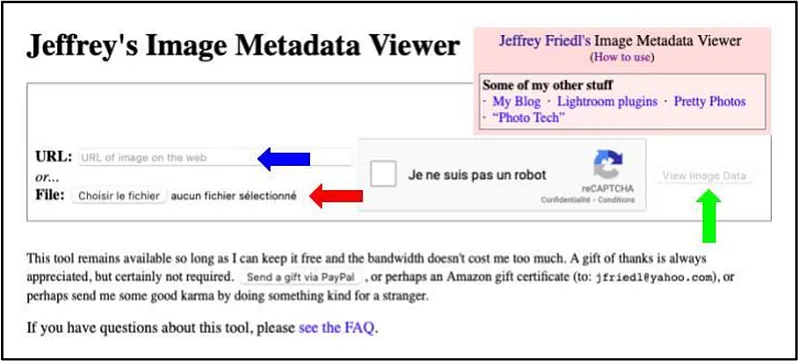
Figure 1: Extracting metadata with Jeffrey's Image Metadata Viewer
Figure 2 shows the result for the Donetsk case we'll look at below. It includes the creation date (Figure 2, blue arrow), the editing tool used (Figure 2, red arrow), and the operating system (Figure 2, green arrow).
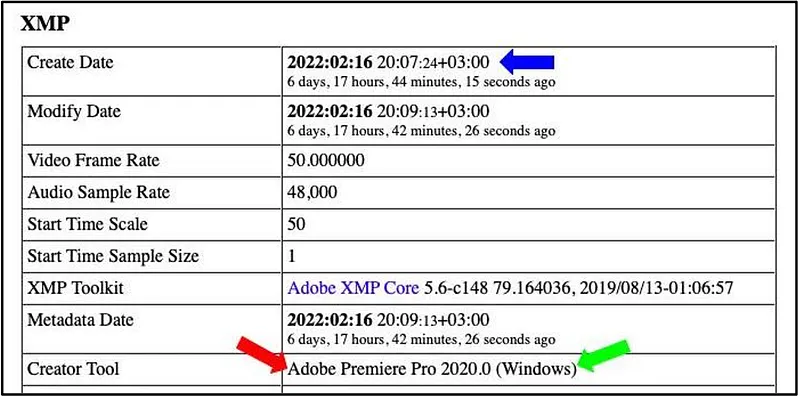
Figure 2: Reading the metadata
For more advanced users, it's also possible to obtain this same data using a command-line tool called ExifTool (Figure 3). You can find a tutorial on using this utility here.
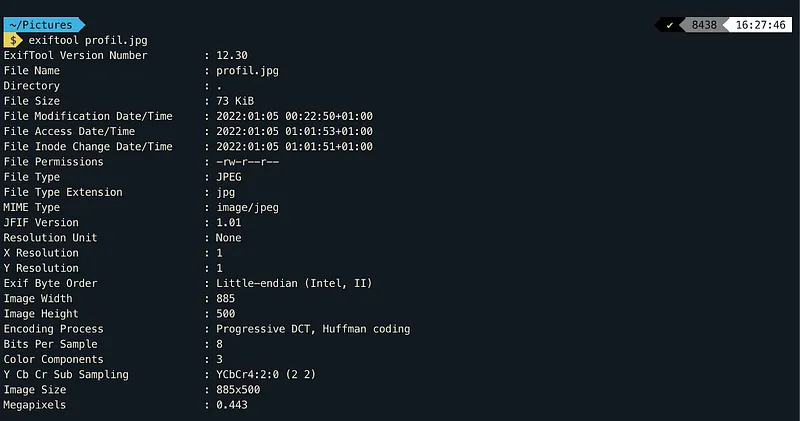
Figure 3: Extracting metadata via the command line
Now that we know how to access metadata, a real-world case will help us understand why it matters.
For several weeks, eastern Ukraine has been gripped by heightened tensions pitting the Ukrainian government against the separatist regions of Donetsk and Luhansk. These two self-proclaimed republics enjoy close support from Russia.
The Minsk agreements of 2015 had established a ceasefire in the region, but it has recently been violated several times by both sides. Indeed, on Friday, February 18, the separatist authorities of Donetsk and Luhansk announced that they had suffered a Ukrainian attack and sabotage that very day. The two separatist regions responded by initiating the evacuation of their population to Russia's Rostov region.
The video announcements of the Donbas evacuation were broadcast on Telegram channels. The announcement video from Denis Pushilin, head of the Donetsk region, was published on his channel @pushilindenis on February 18 at 4:04 PM local time. Likewise, the video in which Leonid Pasechnik, head of the Luhansk region, announces the evacuation of his region was published an hour later on the channel of the Luhansk Information Center @LIC_LR.
Unlike other social networks and messaging apps, Telegram doesn't strip the metadata from media files shared on its platform. Many open-source researchers rushed to check the metadata of these messages, which marked a significant escalation of tensions in the region. Extracting the metadata from both videos showed that they had both been created on February 16 — two days before the alleged Ukrainian attacks that supposedly prompted the evacuation.
This simple piece of data thus revealed that the Luhansk and Donetsk regions were going to be evacuated no matter what, two days before the announcements were even published, and that the Ukrainian attack potentially never happened or was staged.
On Twitter, @olya_sydii and @krystoferivanov shared this discovery in a thread posted the same day, along with a video showing exactly how to access this metadata from a computer running Windows (Figure 4). The interface is in Ukrainian, but the procedure can be translated as follows:
- Right-click on the video;
- Select "Save as" to download it;
- In your documents, right-click on the video, then select "Properties";
- In the Properties window, select the "Details" tab;
- The "Media created" line shows you the video's creation date.
Figure 4: Video from @olya_sydii shared by @krystoferivanov
As a result, metadata is easily accessible information that provides more insight into the media presented to us. That said, it should be examined critically, since it can be edited. Metadata nonetheless remains important information for open-source research, and it's within everyone's reach to verify the accuracy of the information they come across every day.
Find all the latest news from Predicta Lab on our Twitter and Linkedin accounts.
Don't miss our future newsletters !
Get the latest OSINT news, monthly recaps and product updates in your inbox.
More articles from Predicta Lab
April 16, 2024 · 7 min read
GEOINT: Using Overpass Turbo for OSINT
Overpass Turbo (OPT) allows you to search for mapped information in the Open Street Map database using command-line queries, making it an unrivalled geolocation tool. This article will show you how to build simple queries to make OPT accessible to everyone.

May 17, 2023 · 6 min read
OSINT Tools: Streamline Your Investigations with Tampermonkey
Tampermonkey is a browser extension that lets you add or modify the features of the websites you visit: let's see how to create your own userscripts to save time in your investigations.
April 26, 2023 · 4 min read
Securi'Tips: What is phishing and how do you detect it on your smartphone?
Despite appearances, this message wasn't sent by ANTAI (the French traffic fine authority): it's a trap designed to harvest the recipient's payment information. Let's take a look at exactly what phishing is and how to detect it on a smartphone.

March 24, 2023 · 12 min read
How to remove your personal data from Google?
You've probably searched your name on Google before, chances are the results included some social media profiles and maybe even some pages you had forgot existed. This article explains how to get Google to deindex a web page containing your personal data.
