
OSINT Tutorial: Searching Tweets by Date and Location, Using the Russian Invasion of Ukraine as an Example
March 4, 2022 · 5 min read
In this article, we'll look at how to target a Twitter search to get results that match our expectations as precisely as possible. Advanced search options help reduce the amount of information you need to verify during an investigation. This is especially useful in the context of the conflict in Ukraine, which is largely covered informally and live on Twitter. As a result, even from France we receive a huge amount of information from multiple sources, all of which would need to be checked to assess its reliability. This tutorial will help reduce that verification workload.
By date: Searching for tweets from the day of the Russian invasion
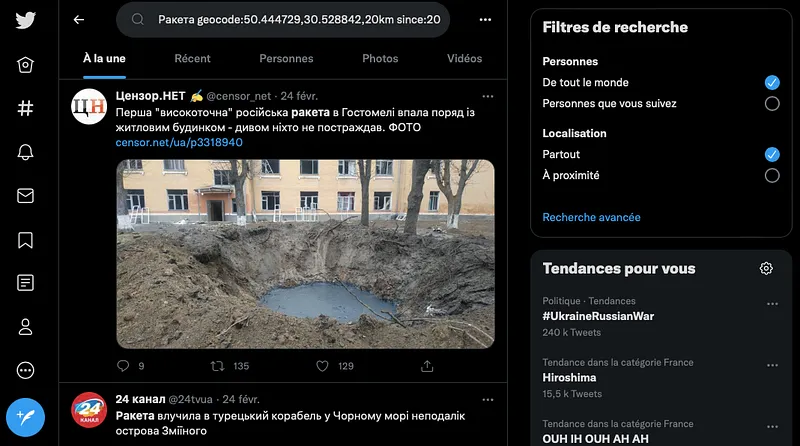
To find tweets posted within a specific time frame, simply run your keyword or topic search as usual, using the search bar at the top right of your Twitter home screen. Once the results of that initial search appear, the "Search filters" panel on the right offers an "Advanced search" option. Clicking that blue link opens a new window where, if you scroll to the bottom, you can specify two dates between which you want the tweets to have been posted. You can also enter your search terms and the target time frame directly in the search bar, using the following format:
Figure 1: Advanced search by date
By location: Searching for tweets around Kiev
In this section, we'll look at two ways to search for tweets based on location. The first requires a VPN that can place you at the location where you want to find tweets. If you don't have one, feel free to skip straight to Method 2.
Method 1: Artificially position yourself in Kiev and search for nearby tweets
Turn on the VPN
You can set your VPN to place you near the location you're targeting. For example, if you want to find tweets from the conflict in Ukraine, you can use Proton VPN, which offers the option to locate your IP address in Kiev.
Turn on the "Near you" search filter
Once your VPN is on, you can simply run your Twitter search as usual and select the "Near you" location option in the "Search filters" panel on the right side of the results page. The results will be tweets posted from Kiev or by profiles that list Kiev as their location in their Twitter bio.
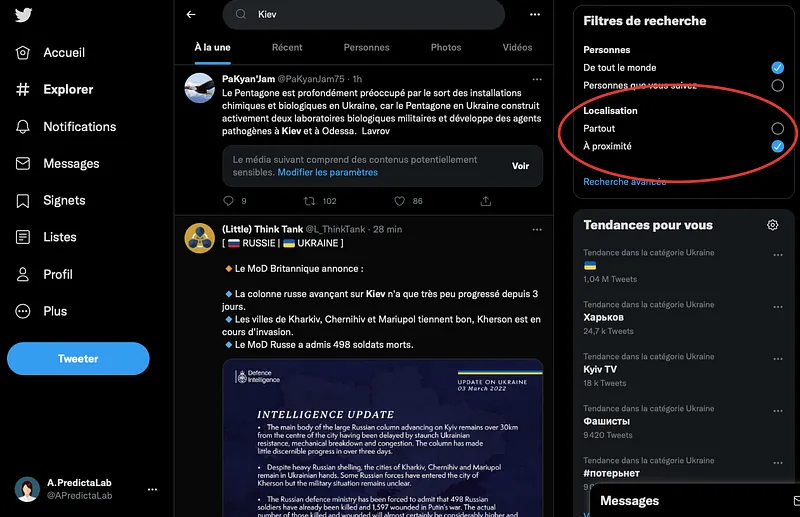
Figure 2: "Near you" filter
Method 2: Enter GPS coordinates and filter the search using operators
Find the GPS coordinates of Kiev
The second way to get tweets from a specific location relies on Twitter's search operators. The main operator we'll use here is geocode. The geocode includes the GPS coordinates of the target location. You can get these from Google Maps by dropping a pin on the location and right-clicking it. Then click the coordinates that appear to copy them to your clipboard.
Figure 3: Finding the GPS coordinates
Run a search using Boolean operators
Next, put these coordinates into the geocode format. For example, the official office of the Ukrainian president in Kiev is located at coordinates (50.444729, 30.528842). To find tweets posted within a 20-kilometer radius of this location, enter the following search:
You can also run a less precise search that doesn't require looking up coordinates. In that case, you'll use the "near:" and "within:" operators, which can be translated as "near" and "within". To search for tweets posted near Kiev within a 5-kilometer radius, you can enter the search:
There are other operators you can use to refine your searches for geolocated tweets (bio_location: ; place_country: etc). You can find them here.
Putting it into practice: Searching for tweets from Kiev on February 24, 2022, the day of the Russian invasion of Ukraine
Let's now put our new skills into practice to find the first reactions to the Russian invasion from Kiev. We know that the invasion began on February 24, 2022, and that the areas around Kiev were bombed. So we'll use the following search, which covers tweets posted on February 24 within a 20-kilometer radius of the Ukrainian president's official office and that mention the word "Ракета" (missile in Ukrainian, according to Google Translate):
Ракета geocode:50.444729,30.528842,20km since:2022–02–24 until:2022–02–25
The results are shown below (Figure 4). We find several photos of the same missile from different angles, which provides more evidence to confirm the location of the impact or identify the model of the projectile.
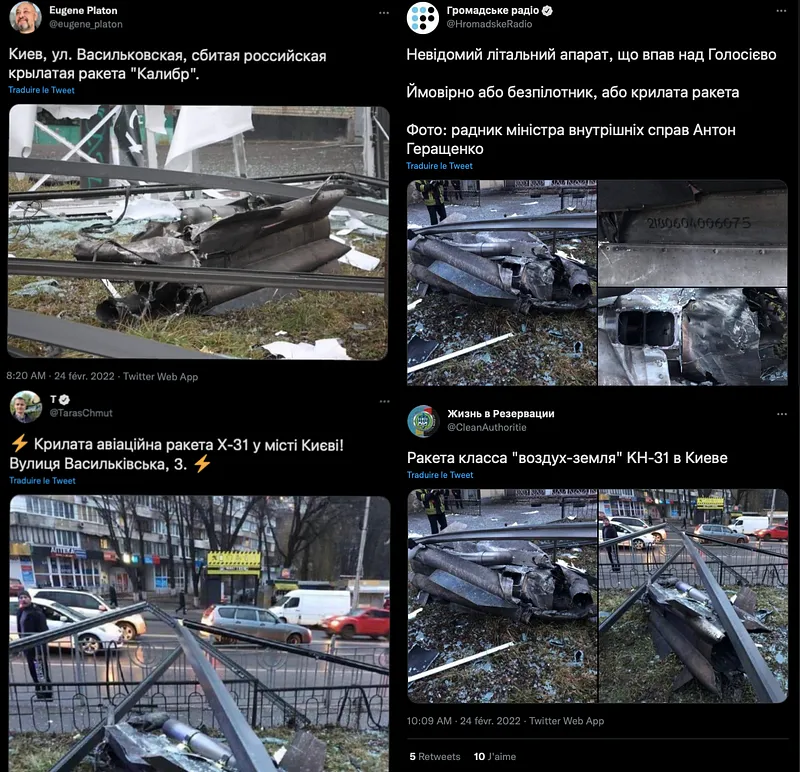
Figure 4: Tweets posted on the day of the Russian invasion around Kiev [1]
You can also filter this search by the language used in the tweet, with lang:uk for Ukrainian or lang:ru for Russian.
Limitations of location-based Twitter search: VPNs and false bios
Location-based tweet search helps target your searches. However, results can also be skewed if tweets are posted with a VPN turned on, or if people list a false location on their profile.
Conversely, this type of search also limits results to tweets posted with location enabled, or posted by users who state their location. Important information can therefore be overlooked if its authors haven't turned on this feature or entered their location in their profile. These limitations don't take away from the advantage that location-based search offers, but they should be kept in mind during an investigation.
In addition, to conduct a thorough search you also need to pay attention to which tab you're viewing. In Twitter search results, the "Top" tab shows popular results, which may be skewed to match your profile, while the "Latest" tab shows the most recent tweets matching your search. These are things to keep in mind to best adapt your investigation.
Follow all the latest news from Predicta Lab on our Twitter and Linkedin accounts, and on predictalab.fr.
Alice Douvillez
[1]https://twitter.com/eugene_platon/status/1496746913537929216 ; https://twitter.com/HromadskeRadio/status/1496725226188644352 ; https://twitter.com/TarasChmut/status/1496747931755552768 ; https://twitter.com/CleanAuthoritie/status/1496774338501963776
Don't miss our future newsletters !
Get the latest OSINT news, monthly recaps and product updates in your inbox.
More articles from Predicta Lab
August 10, 2026 · 13 min read
DumpSec: unsophisticated but not low-impact
Following the traces of Dumpsec, a French cybercriminal group, across underground forums: how it built its presence, monetized stolen data, and how its own online activity contributed to its downfall.
August 29, 2024 · 3 min read
How to discover a major hacker's identity with OSINT — Solution 2
A second sequence of open-source discoveries leading from the hacker USDoD's Twitter profile to his real-life identity.
August 28, 2024 · 4 min read
How to discover a major hacker's identity with OSINT — Solution 1
Last week CrowdStrike revealed the identity of the famous hacker USDoD and today we will retrace how he was discovered with an open source investigation of our own.

May 15, 2024 · 4 min read
Investigating Lockbit’s leader
On May 7, 2024, the Office of Foreign Assets Control along with other american government agencies revealed several pieces of information about LockBit’s leader, Lockbitsupp. Let’s see what we can find out about him using this information.
